


 Written by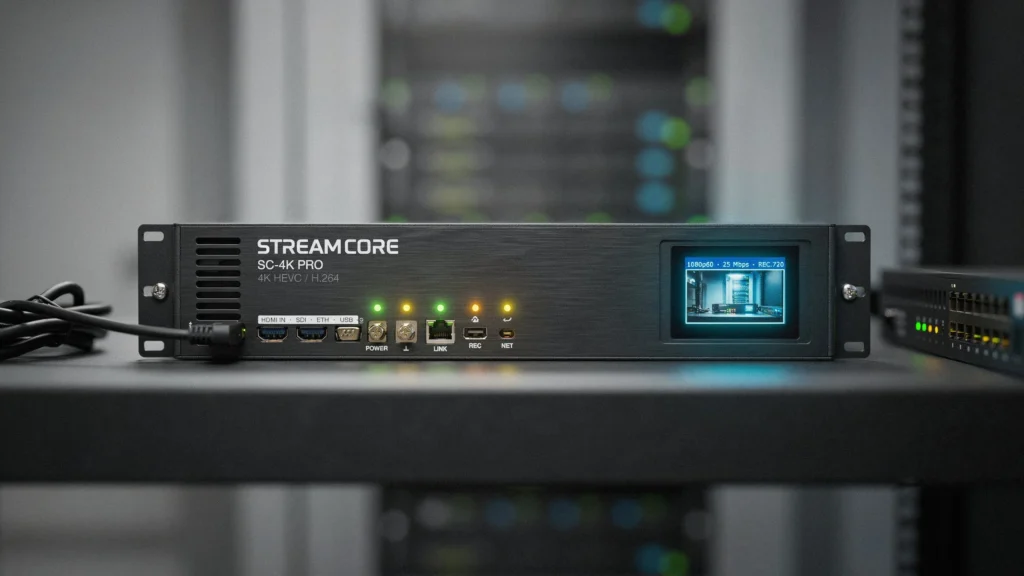
How to Choose and Setup a 4K IPTV Encoder for Premium Streaming
Are you looking to broadcast high-definition video over your local network and searching for a reliable 4k iptv encoder to handle the processing? Whether you are setting up a private streaming server, broadcasting live events, or distributing HDMI signals across a hotel network, video compression is critical. A professional 4k iptv encoder bridges the gap between raw video sources and IP-based streaming platforms.
In this comprehensive guide, we will explore how hardware encoders work, the essential features you must check before purchasing, and how to configure your local network to handle ultra-high-definition video signals without any lag.
How a Hardware 4k iptv encoder Works
Before diving into setup configurations, it helps to understand what happens inside the hardware. By feeding your raw HDMI or SDI video source directly into the 4k iptv encoder, the device compresses the heavy video signal into standard IP streaming protocols (such as RTSP, RTMP, SRT, or HTTP).
Without this compression, raw 4K video streams would require massive bandwidth that standard network cables cannot support. Choosing the right hardware like a dedicated 4k iptv encoder is crucial because it offloads the heavy processing work from your computer’s CPU, preventing frame drops and compression lag during long live-streaming sessions.
Key Features to Check Before Buying a 4k iptv encoder
The hardware market offers many different encoding models, but not all of them are built for ultra-high-definition distribution. When comparing devices, look for these advanced features:
1. H.265 (HEVC) Video Compression Support
4K video contains four times as many pixels as standard 1080p Full HD. Therefore, make sure the 4k iptv encoder you select supports H.265 (HEVC) compression. H.265 is twice as efficient as H.264, allowing you to stream crystal-clear 4K video using half the bandwidth.
2. Multi-Protocol Streaming Compatibility
A versatile encoder should support multiple network protocols simultaneously. This allows you to push streams to YouTube (using RTMP), stream over local networks (using RTSP), or deliver ultra-low-latency feeds across the internet (using SRT).
Bandwidth and Speed Requirements for Ultra HD Encoding
Even if you purchase the most advanced encoding hardware, your stream stability still depends on your local network’s bandwidth. High-resolution streams require a highly stable broadband connection to prevent frame drops.
To ensure your network is fully prepared to transmit the processed video feed from your encoder, check out our guide on what internet speed do i need for iptv streaming. If you plan to distribute the generated stream to various televisions in your home, you can learn how to manage multiple device connections in our multi-device setup tutorial.
Setting Up Your 4k iptv encoder on Your Local Network
Configuring a hardware video encoder is a straightforward process once you understand the basic network parameters. Follow these standard setup steps:
- Connect your video source (camera, computer, or media box) to the HDMI input of the encoder.
- Connect the encoder’s LAN port to your network switch or router using a high-speed Ethernet cable.
- Open a web browser on your computer, enter the default IP address of your encoder, and log into the admin dashboard.
- Navigate to the “Encoding Settings” and select HEVC/H.265 as your video codec. Set your resolution to
3840x2160. - Set your destination protocol (such as RTMP/SRT) and enter your target streaming server URL.
Once you configure the network parameters of your 4k iptv encoder, you can generate a clean playlist path to distribute the video. If you are setting up compatible media players to stream this feed, check out our M3U playlist URL setup guide. For a complete tutorial on configuring Smart TVs, check our device configuration guides.
Ensuring Secure Transactions When Buying Hardware
Because premium video encoding hardware represents a significant financial investment, you should only purchase from verified sites with encrypted checkouts. For a safe checkout experience, read our secure payment methods guide to protect your financial details during checkout.
Conclusion
In summary, investing in a high-quality 4k iptv encoder is the ultimate way to stream low-latency, ultra-high-definition video feeds across your local network or to global streaming platforms. By choosing hardware with H.265 support, optimizing your network bandwidth, and configuring standard protocols, you can deliver a professional-grade viewing experience with absolute peace of mind.
Frequently Asked Questions (FAQ)
What is the difference between a software and a hardware IPTV encoder?
A software encoder uses your computer’s CPU to compress video, which can slow down your system. A hardware encoder is a dedicated physical device with its own internal processor, providing much higher stability and reliability for continuous 24/7 streaming.
Why is H.265 (HEVC) crucial for a 4K encoder?
HEVC/H.265 compression reduces the required file size of 4K video by approximately 50% compared to H.264, allowing you to stream 4K quality over normal internet speeds without buffering.
Can I stream to multiple platforms (YouTube, Twitch, private server) at the same time?
Yes, many premium hardware encoders support multi-stream outputs, allowing you to encode a single video input and push it to multiple RTMP/SRT destinations simultaneously.
Do I need a special HDMI cable for a 4K encoder?
Yes. To transmit true 4K video at 60 frames per second, you must use a high-speed HDMI 2.0 or HDMI 2.1 cable between your camera/source and the encoder.
Ready to Upgrade Your Streaming Setup?
Unlock the power of ultra-high-definition streaming today. Browse our premium, high-speed streaming packages designed to handle heavy video signals with maximum uptime and zero buffering.
