September 9, 2026



 Written by IPTVSMARTERSPRO-UK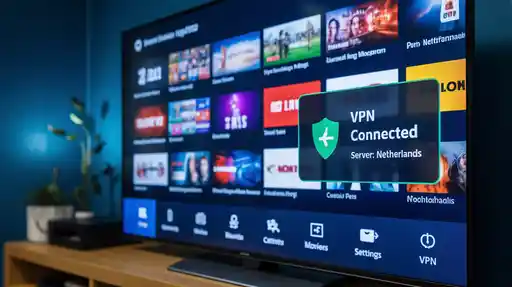
Internet television has changed the way people watch content. Instead of relying on traditional cable or satellite providers, many viewers now prefer IPTV services that stream television channels and on-demand content through the internet. While this technology provides flexibility and convenience, it also raises concerns related to privacy, security, and internet restrictions. Because of this, many users choose to combine their IPTV service with a virtual private network.
Using iptv with vpn has become a popular approach for people who want a safer and more private streaming experience. A VPN encrypts internet traffic and routes it through secure servers, which can help protect your online activity and improve overall privacy. This guide explains what IPTV is, how VPNs work, why people combine them, and how to set everything up properly.
IPTV stands for Internet Protocol Television. Instead of broadcasting television signals through traditional cable or satellite networks, IPTV delivers video content through internet protocols. This means that shows, movies, and live channels are streamed directly through your internet connection.
The technology behind IPTV allows viewers to access a wide range of content from various devices. These devices include smart TVs, smartphones, tablets, computers, and streaming boxes. Because IPTV relies on internet delivery, users can watch content from almost anywhere with a stable internet connection.
Another advantage is flexibility. Unlike traditional cable packages that include fixed channel lists, IPTV services often allow users to customize their viewing experience. Some platforms offer live television, while others focus on video-on-demand libraries. Many users combine both features to create a personalized entertainment setup.
A virtual private network, commonly known as a VPN, is a tool designed to enhance privacy and security while using the internet. When you connect to a VPN, your internet traffic passes through an encrypted tunnel before reaching its destination. This process hides your IP address and helps prevent third parties from easily monitoring your online activity.
VPN technology is widely used for many purposes, including protecting personal data on public Wi-Fi networks, maintaining online privacy, and accessing online services securely. Businesses also rely on VPNs to allow employees to safely connect to internal systems when working remotely.
When IPTV users choose to stream using iptv with vpn, they are typically looking to add an extra layer of privacy while watching their favorite content online.
Streaming media requires continuous data transfer. Because of this, users often want to ensure that their connection remains secure and stable. Using iptv with vpn can provide several advantages depending on the user’s needs and network environment.
One of the main reasons people use a VPN is privacy. Without a VPN, internet service providers and other network intermediaries may be able to see certain aspects of your internet traffic. A VPN encrypts that data, which can help reduce visibility into your online activity.
Public Wi-Fi networks, such as those in cafes, airports, and hotels, are often less secure than private networks. When streaming IPTV on public Wi-Fi, using a VPN helps protect your data from potential interception. This is one reason many viewers choose iptv with vpn when traveling.
Some internet users believe their connection speed slows down when they stream large amounts of video data. Although this does not occur in every situation, VPN encryption may help prevent certain types of traffic analysis that could contribute to throttling. As a result, some viewers prefer using iptv with vpn to maintain consistent streaming performance.
Different regions sometimes have different content availability. While access rules vary depending on licensing agreements and platform policies, a VPN can route traffic through servers located in other regions. This may provide additional flexibility depending on the services being used.
Understanding how IPTV functions can help you see why many users integrate VPN technology into their streaming setup. IPTV relies on packet-based delivery over internet networks. Instead of broadcasting signals simultaneously to all viewers, IPTV servers deliver video streams directly to individual devices when requested.
This on-demand delivery allows for features such as pause, rewind, and interactive playback. It also allows IPTV providers to distribute thousands of channels and large content libraries efficiently.
However, because the system relies entirely on internet infrastructure, it also depends on network stability and bandwidth. When users combine IPTV with VPN services, they create an additional encryption layer that may affect speed slightly, but often provides stronger privacy protection.
Using iptv with vpn involves routing your streaming traffic through a VPN server before it reaches the IPTV provider. This process involves several steps:
Although this adds an extra step to the connection process, modern VPN providers maintain high-speed networks that can handle video streaming effectively.
One reason IPTV has grown rapidly is its compatibility with many devices. Users can install IPTV applications on smart TVs, mobile devices, streaming boxes, and personal computers.
Similarly, VPN providers offer apps for multiple operating systems, making it easy to combine both technologies. Devices commonly used for IPTV streaming include:
When these devices support VPN apps directly, setting up iptv with vpn becomes relatively simple.
Setting up iptv with vpn generally involves a few straightforward steps. While exact instructions vary depending on the devices and services used, the overall process is similar across platforms.
Look for a VPN provider that offers strong encryption, reliable server networks, and apps compatible with your device. Speed and server availability are important factors for streaming.
Download the VPN app for your device. Most providers offer apps for Android, iOS, Windows, macOS, and smart TV platforms.
After installing the app, open it and connect to a server location. Once connected, your internet traffic will pass through the encrypted VPN tunnel.
With the VPN active, open your IPTV application and start streaming normally. At this point your connection is protected by the VPN layer.
While VPN encryption provides security benefits, streaming quality still depends heavily on network speed and stability. Here are several tips that can help maintain smooth IPTV playback.
These steps can help ensure that using iptv with vpn does not negatively impact your streaming experience.
There are many misconceptions about IPTV and VPN usage. Some people believe VPNs automatically improve video quality, while others think IPTV always requires one. In reality, these technologies serve different purposes.
A VPN primarily focuses on privacy and security, not necessarily streaming quality. Likewise, IPTV can function normally without a VPN in many cases. The decision to combine them depends on individual preferences and network conditions.
When using internet technologies such as IPTV services and VPNs, it is important to follow applicable laws and service agreements in your region. Different countries have different regulations related to streaming platforms and internet privacy tools.
Users should always choose legitimate IPTV providers and ensure their usage complies with local regulations. Responsible use helps maintain a safe and sustainable digital ecosystem for content creators, distributors, and viewers.
Streaming technology continues to evolve rapidly. Advances in broadband infrastructure, cloud computing, and video compression are making internet television more efficient than ever. As global internet speeds increase, IPTV platforms will likely deliver higher resolution streams, interactive features, and personalized viewing experiences.
Privacy technologies are also advancing. VPN providers are constantly improving encryption protocols and server infrastructure to handle increasing demand from streaming users. Because of this, many experts expect the combination of iptv with vpn to remain a common approach for viewers who prioritize privacy and security.
IPTV has transformed how people access television content by delivering entertainment directly through the internet. Combined with VPN technology, viewers can add an additional layer of privacy and security to their streaming setup.
Whether you are streaming from home or while traveling, understanding how IPTV and VPNs work together can help you create a more flexible and secure viewing environment. By choosing reliable services, maintaining strong internet connections, and following responsible usage practices, users can enjoy modern streaming technology with confidence.
© IPTV Smarters Pro UK - best IPTV subscription uk

You cannot copy content of this page